For organizations, especially those in regulated industries or government, using Copilot’s web search features has sometimes been tricky due to concerns about data privacy. That’s where Zero Query Logging (ZQL) comes in. It helps address three main worries:
How ZQL Helps You
Privacy Assurance: Zero Query Logging removes the old way of holding onto your search queries in Bing. Now, when ZQL is active, Bing doesn’t keep any record of your searches. This means no search history is stored on Bing’s side, which significantly reduces compliance risks and boosts your privacy.
Control & Transparency: As an administrator, you have full control. You can easily turn ZQL on or off using a simple switch in the Cloud Policy Service for Microsoft 365. This policy can be applied to your entire organization or to specific users and groups for testing purposes.
Safely Enabling Web Grounding: If you previously turned off web search in Copilot because you were worried about data being kept during the Bing grounding process, you can now confidently turn it back on. ZQL ensures that Bing won’t hold onto any of your query data.
This is especially important for our GCC-High customers. Microsoft delivers Copilot to GCC-High with web grounding turned off by default to make sure sensitive government data stays within your compliance boundaries. ZQL provides a safe way to re-enable web grounding in this environment.
How It All Works: A Look at the Technical Side
Standard Web Grounding (Without ZQL): When web search is enabled in Microsoft 365 Copilot without ZQL, here’s what happens:
- Copilot Asks: Copilot looks at your request and figures out if it needs web information to give you a better answer. It then creates a short search query based on your prompt.
- Cleaning Up the Query: This search query is different from your original prompt. Here’s what’s not included when it’s sent to Bing:
- Your entire prompt (unless it’s super short, like”local weather”)
- Your full Microsoft 365 files (like emails or documents) or files you upload to Copilot
- Complete web pages or PDFs that Copilot summarized in Edge
- Any personal identification information from your Microsoft Entra ID (like your username, domain, or tenant ID)
- Sending the Query: The cleaned-up query is sent to Bing. Don’t worry, any user and tenant identifiers are removed. Your original prompt and Copilot’s response always stay within the Microsoft 365 service.
- Getting Results: Bing sends back search results. Copilot then uses these results, along with any internal Microsoft 365 data, to create its answer for you.
Normally, these Copilot-generated queries sent to Bing don’t mess with Bing features like search ranking, answers, or social features. According to Microsoft Product Terms, these queries aren’t used to make Bing better, create advertising profiles, track your behavior, share with advertisers, or train AI models. They’re treated as confidential customer information.
However, without ZQL, the Bing search service works separately from Microsoft 365 and has different rules for handling data. These queries are subject to the Microsoft Services Agreement and Privacy Statement, where Microsoft acts as a data controller (meaning they decide how the data is used), not just a data processor.
How ZQL Changes Things
When ZQL is turned on, the data flow takes a different path at a very important point:
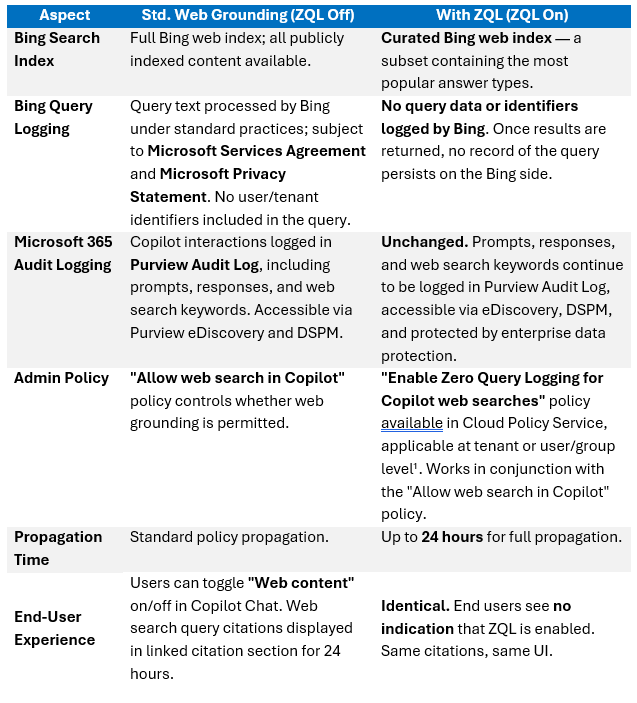
- Special Search Index: Instead of searching the entire Bing web index, Copilot’s web searches go to a special, curated web index that Microsoft built just for Copilot web queries. This index is a smaller version of the full Bing index, focusing on the most popular types of answers.
- No Logging, Period: When your query runs against this special index, Bing doesn’t log any of your query data or identifiers. Once Copilot gets the results, there’s no lasting record of your query on Bing’s side. ZQL makes sure that no data related to Copilot’s web searches is stored in Bing.
- Purview Logging Stays the Same: Your Copilot interactions—including your prompt, the response, and the exact web search keywords—are still recorded in the Microsoft Purview Audit Log, just like always.
It’s worth noting that Microsoft’s public information only says this curated index contains “a subset of the full index used for Bing with the most popular answer types.” The exact details of what’s in it, how often it’s updated, and how things are chosen aren’t public. So, keep in mind that super niche or brand-new content might not be in this special index—that’s the trade-off for the extra privacy.
Standard Web Grounding vs. ZQL: A Quick Comparison
Purview Audit Log Details (Unchanged by ZQL)
ZQL doesn’t mess with your organization’s internal audit capabilities. Administrators still have full visibility into Copilot’s web search activities through existing Microsoft Purview tools:
- Purview Auditing: Administrators can search for CopilotInteraction audit log events. In the exported audit records, the property AISystemPlugin.Id shows if a Copilot interaction involved a Bing web search—if it did, the value will contain BingWebSearch.
- Purview eDiscovery: The Bing search query is stored in the user’s Exchange mailbox as part of the Copilot response metadata. eDiscovery Managers can search using the Copilot Activity filter in the eDiscovery condition builder. When results are downloaded and viewed in a text editor, the term WebSearchQuery will appear if a web search was performed, along with the actual query text sent to Bing.
- Purview DSPM for AI: Administrators can view the actual web search terms Copilot used, displayed alongside the original prompt, response, and supporting resources, through the activity explorer in Microsoft Purview DSPM for AI.
Data Handling and Compliance Considerations
Regulatory Framework for Web Search Queries
Even with ZQL enabled, sending a web search query to Bing means data momentarily leaves the Microsoft 365 service boundary. Here’s how different regulations apply to these generated search queries:
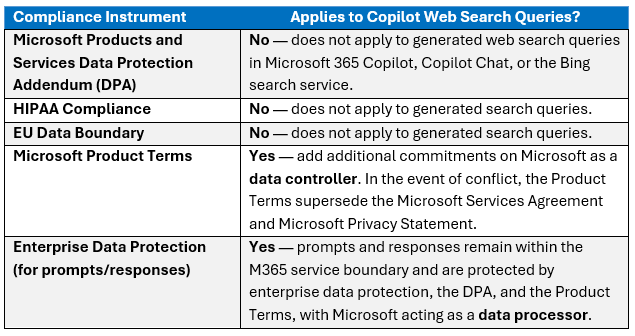
Key distinction: Microsoft acts as a data processor for prompts and responses (which stay within M365), but as a data controller for the web search queries sent to Bing. ZQL helps by ensuring query data isn’t kept on the controller side, but it’s important to know that DPA, HIPAA, and EU Data Boundary protections don’t cover the web search query itself.
GCC-High Specific Context
GCC-High environments have strict data residency and compliance rules:
- Compliance Frameworks: GCC-High Copilot follows FedRAMP High, DFARS, ITAR, CMMC, and other critical compliance requirements.
- Data Residency: All data stays within U.S.-based data centers managed by screened U.S. personnel. Data is encrypted in transit and at rest, with Microsoft Entra ID enforcing role-based access.
- Web Grounding Default: Web grounding is turned OFF by default in GCC-High to make sure sensitive government data doesn’t leave the compliance boundary. This default also applies more broadly across Government cloud environments.
- Microsoft Purview Integration: Microsoft Purview and Enterprise Data Protection (EDP) are natively integrated for security, governance, and policy enforcement in GCC-High.
- Responsible AI: Copilot in GCC-High incorporates Microsoft’s Responsible AI principles, including safeguards against prompt injection and misuse.
GCC-High became generally available on December 1, 2025. Wave 2 features, including the Researcher Agent, Analyst Agent, Code Interpreter, GPT-5, Image Generation, Microsoft 365 Copilot Connectors, and Copilot Search, are expected to roll out to GCC-High in the first half of 2026.
ZQL gives GCC-High administrators a way to safely turn web grounding back on while ensuring no query data sticks around outside the trusted Microsoft 365 environment.
Administrative Configuration Guide
Policies and Enablement
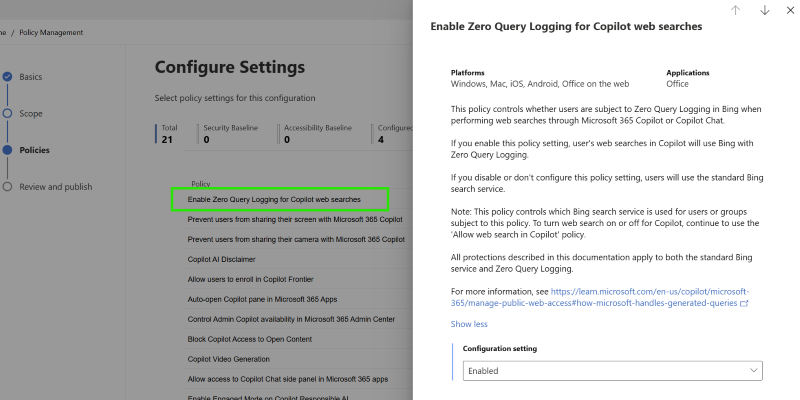
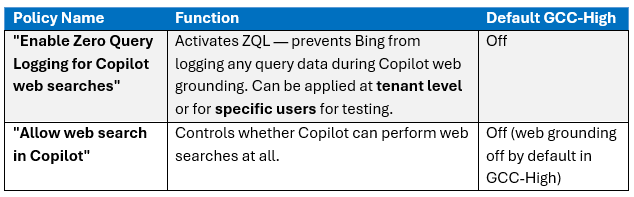
Two policies manage ZQL and web grounding in Copilot. Both are handled via the Cloud Policy Service for Microsoft 365 (accessible through the Microsoft 365 Admin Center):
Recommended Enablement Sequence
Microsoft recommends a specific order for turning these policies on:
- Step 1: Enable the “Enable Zero Query Logging for Copilot web searches” policy.
- Step 2: Wait 24 hours for the ZQL policy to fully propagate across Copilot services.
- Step 3: Enable the “Allow web search in Copilot” policy, following the instructions in the Microsoft Learn article “Data, privacy, and security for web search in Microsoft 365 Copilot and Microsoft 365 Copilot Chat”.
This sequence ensures that by the time web search is active for users, ZQL is already fully working, preventing any window where queries might be processed under standard (non-ZQL) conditions.
Policy Activation Timeline
Once the ZQL policy is enabled, it can take up to 24 hours to fully propagate. During this time, some Copilot service instances might not know about the ZQL setting yet. Once propagation is complete, ZQL prevents the storage of any data related to web grounding queries in Copilot in Bing.
End-User Visibility
End users won’t see any indication that ZQL is enabled in the Copilot Chat user experience. ZQL is a purely administrative, server-side control. Users will continue to see the same interface, the same web search query citations in the linked citation section of responses, and the same web content toggle. There’s no user-facing toggle or indicator for ZQL.
Scope, Limitations, and Considerations
Scope of ZQL
ZQL only applies to web search queries generated by Microsoft 365 Copilot, Copilot Chat, and the Researcher agent during web grounding. It does not apply to:
- Manual searches on Bing.com or any other search engine by users
- Other Copilot products (e.g., GitHub Copilot, Security Copilot, Azure OpenAI)
- Other Microsoft 365 telemetry, diagnostics, or service health data
Curated Index Trade-offs
The curated web index used under ZQL is a smaller version of the full Bing index, focusing on the most popular answer types. This means:
- Advantage: Queries are served from a controlled, privacy-focused index that doesn’t keep query data.
- Trade-off: Extremely niche, newly indexed, or uncommon web content might not be in this special index. Microsoft hasn’t published the exact contents, update frequency, or selection criteria for this index. Organizations should test with representative queries to see if the curated index meets their needs.
Transient Data Exposure
Even with ZQL, the web search query is still sent to the Bing search service for processing—it’s just not kept there. This means sensitive information included in a user’s prompt could still be momentarily transmitted outside the Microsoft 365 service boundary as part of the derived search query. Microsoft’s documentation notes that the generated query doesn’t include the user’s entire prompt, entire files, or user/tenant identifying information, but parts of the prompt that inform the search terms will be included in the query sent to Bing.
Best practice for user training: Organizations should teach users that web-grounded Copilot prompts result in search queries leaving the tenant boundary. Users should avoid putting highly sensitive or classified information in prompts that are likely to trigger web searches—even though ZQL ensures the query isn’t kept, it’s still sent out.
As mentioned earlier, the Microsoft Products and Services DPA, HIPAA compliance, and EU Data Boundary don’t apply to the generated web search queries. ZQL reduces the risk by preventing retention, but it doesn’t change the regulatory classification of the data flow. Organizations with strict regulatory mandates should keep this in mind for their risk assessments.
Product Terms Protections (With or Without ZQL)
- Whether ZQL is on or off, the Microsoft Product Terms provide the following commitments for Copilot-generated web search queries sent to Bing:Microsoft has no rights to the queries other than what’s needed to provide the service
- Queries are not used to improve Bing
- Queries are not used to create advertising profiles or track user behavior
- Queries are not shared with advertisers
- Queries are not used to train generative AI foundation models
- Queries are treated as customer confidential information and protected by appropriate technical and organizational measures
ZQL adds an extra guarantee on top of these commitments: absolutely no persistent storage of query data in Bing’s systems.
An Example Scenario
Imagine a security architect in a GCC-High tenant needs to use Copilot to research the latest NIST 800-171 revision guidance.
Without ZQL, enabling web search means the query Copilot generates (e.g., “NIST 800-171 Rev 3 requirements 2026”) would be processed by Bing under standard data-handling practices. The query would be subject to the Microsoft Services Agreement and Privacy Statement rather than the enterprise DPA.
With ZQL enabled, that same query is routed through the curated index, and Bing keeps no record of it. The architect’s organization can still verify in the Purview Audit Log that Copilot searched for “NIST 800-171 Rev 3 requirements 2026”, maintaining full compliance visibility while eliminating external data retention risk.
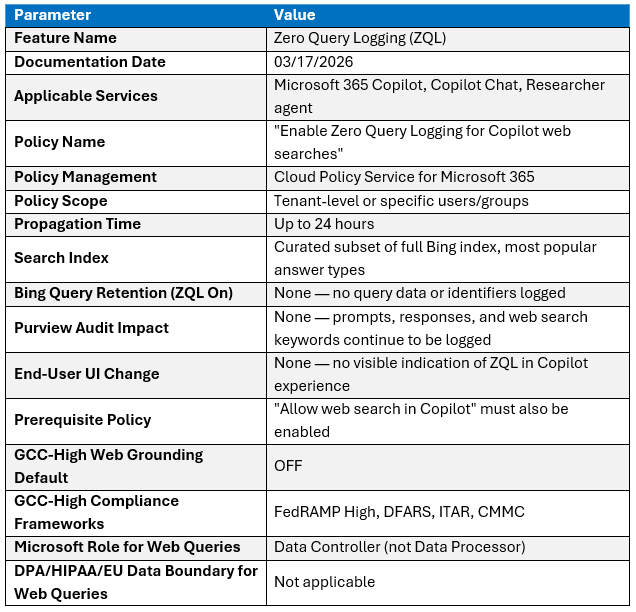
Summary of Key Technical Specifications