A Technical Deepdive
Microsoft 365 Copilot doesn’t read the internet version of your tenant. It reads the real one — the same one your engineers, attorneys, and product leads see, with the same permissions, the same broken inheritance, the same ten-year-old “Everyone except external users” ACLs that nobody has audited since the site was spun up. That is precisely the problem. Copilot is not a new attack surface so much as a ruthless auditor of the one you already have. Anything a user can technically reach, Copilot can surface, summarize, and recompose into a single tidy answer. For an organization’s Secret Squirrel content — patents in prosecution, trademark strategy, source code and architecture, copyrighted works, and above all trade secrets — that risk is acute.
It is also a legal risk of a particular kind. Trade secret status under the Defend Trade Secrets Act and the Uniform Trade Secrets Act requires the owner to take “reasonable measures” to maintain secrecy. A tenant in which Copilot routinely summarizes trade secret documents into responses for users who have no legitimate need to see them is a tenant whose counsel will have a hard time arguing that reasonable measures were taken. The controls in this guide are not just governance hygiene; they are part of the evidentiary record for preserving IP rights.
This guide is a technical playbook for keeping Secret Squirrel content out of Copilot’s grounding set in SharePoint and OneDrive. It is organized around a layered defense model: classify the data, lock the container, scope what Copilot and enterprise search can even see, restrict what encrypted content Copilot is permitted to process, and monitor continuously with DSPM for AI. None of these layers is sufficient on its own. Together, they form a defensible posture — and a defensible record.
How Copilot actually grounds on SharePoint content
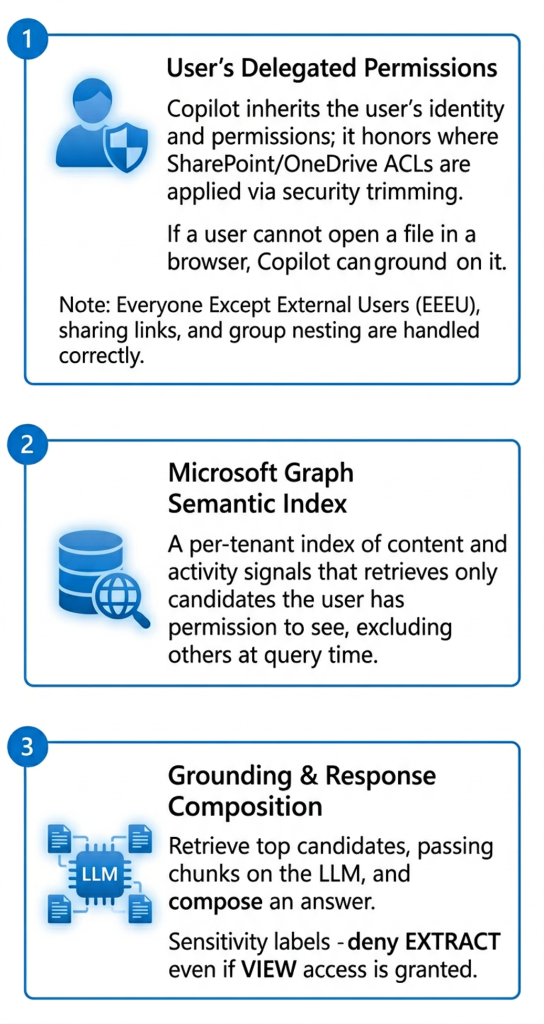
Before choosing controls, understand the retrieval path. Copilot’s SharePoint grounding runs through three layers:
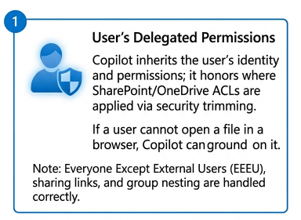
1. The user’s delegated permissions: Copilot inherits the identity of the prompting user and honors SharePoint/OneDrive ACLs via security trimming. If the user cannot open the file in a browser, Copilot cannot ground on it. This is the single most important control — and the single most overstated one, because “cannot open” is a lower bar than most organizations realize once you count Everyone Except External Users (EEEU), broad-scope sharing links, group nesting, and site-level membership that accumulated during a decade of cross-team R&D collaboration.
2. The Microsoft Graph semantic index: Graph maintains a per-tenant semantic index of content and activity signals that Copilot uses to retrieve candidate documents. Items the user has permission to see are candidates for grounding; items they do not are excluded at query time.
3. Grounding and response composition: Copilot retrieves top candidates, passes relevant chunks to the LLM as grounding context, and composes an answer. If a document carries a sensitivity label with usage rights that deny EXTRACT, Copilot will not include its content in the composed answer even if the user has VIEW access.
1. The user’s delegated permissions: Copilot inherits the identity of the prompting user and honors SharePoint/OneDrive ACLs via security trimming. If the user cannot open the file in a browser, Copilot cannot ground on it. This is the single most important control — and the single most overstated one, because “cannot open” is a lower bar than most organizations realize once you count Everyone Except External Users (EEEU), broad-scope sharing links, group nesting, and site-level membership that accumulated during a decade of cross-team R&D collaboration.
How Copilot actually grounds on SharePoint content
Lorem ipsum dolor sit amet, consectetur adipiscing elit. Ut elit tellus, luctus nec ullamcorper mattis, pulvinar dapibus leo.